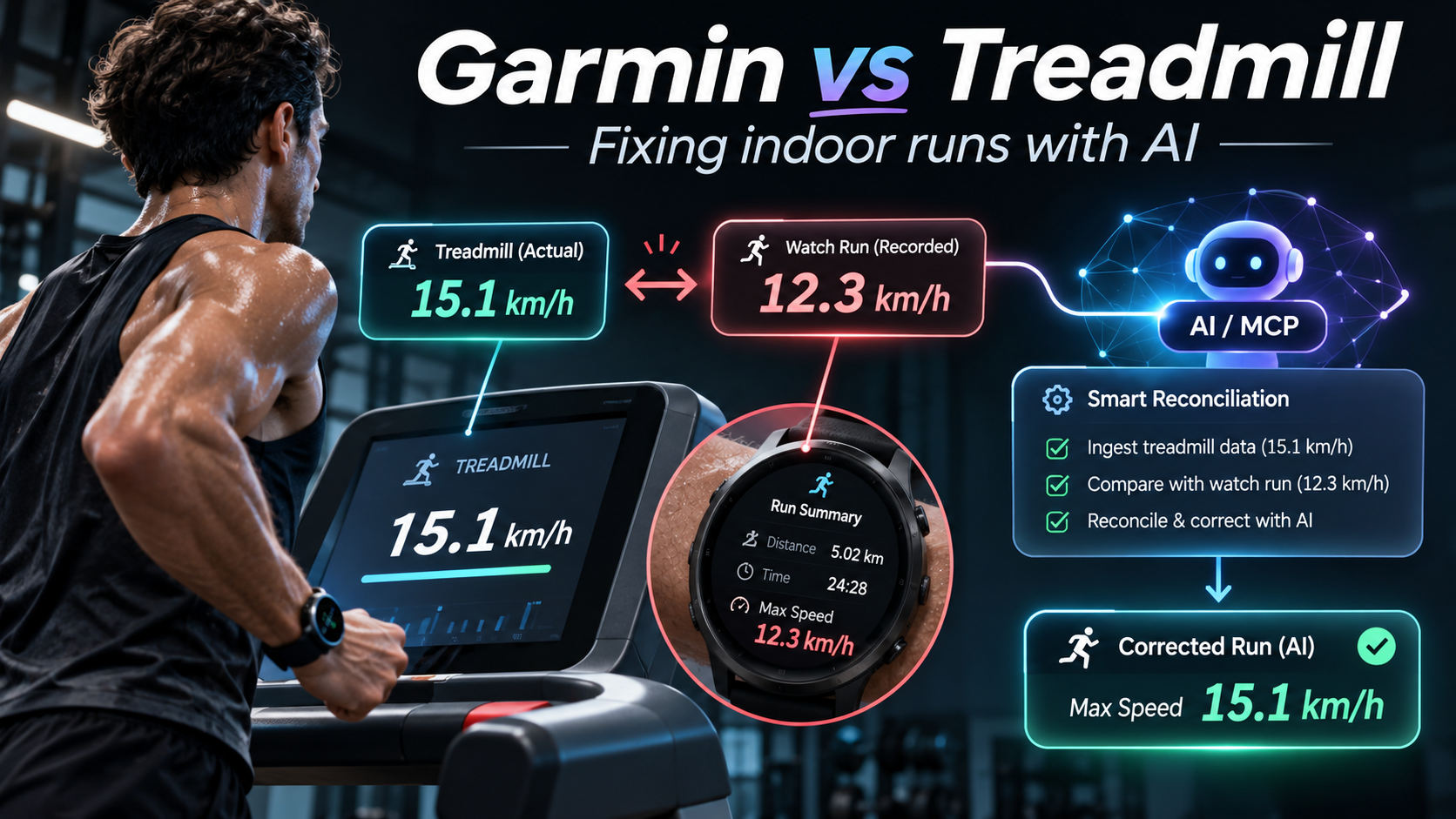
The treadmill said 15.1 km/h. My Garmin said 12.3 km/h. Apparently, we’d been doing two completely different runs on the same machine.
I was there. I ran it. My legs remember it rather well.
And somehow that disagreement sent me down a rabbit hole that lasted a year and a half. Watches, apps, sensors, spreadsheets. All because I wanted the numbers from a run I’d actually completed.
From one watch to another… and another
This nonsense started in April 2025. Yes, really.
First it was Life Fitness treadmills, a Mi Band 9, Apple Health and MapMyRun. The chest strap showed my heart rate beautifully on the treadmill screen. Export the workout, though, and apparently my heart had taken the day off.
The treadmill knew how fast I was going. The chest strap knew what my heart was doing. Getting both into the same workout, however, seemed to require a diplomatic summit between devices that refused to speak to each other.
Then came the older, stubbornly offline treadmills at Fitness First. We tried iSmoothRun, more recording combinations and eventually an Apple Watch Series 11. Roughly S$1,200 later, I returned the watch.
Lovely watch, actually. But after spending that much money, I thought asking it to let me correct an indoor run wasn’t particularly unreasonable.
So we started looking at things to attach to shoes. Stryd, COROS POD 2, even NPE RUNN, which attaches to the treadmill. Then came the smart-shoe archaeology: Nike+, Adidas miCoach and assorted attempts to turn footwear into an information system.
Think about that for a moment. We were considering buying a computer for my shoe because the treadmill and the watch couldn’t agree on how far I’d run. Sisyphus, but with Bluetooth.
18 May. Two records. And a watch with opinions.
Running log · 18 May 2026
Two personal records
The run that mattered.
Two records, more than two decades after the ones I set at eighteen. And Garmin had its own version of both.
★ Personal record / 1 km
4:0015 km/h
Treadmill1.00 km
Garmin≈ 0.91 km
★ Personal record / 3.03 km
12:55elapsed
Actual average pace4:16/km
Garmin recorded4:48/km
A 32 sec/km disagreement. On the same run.
The first comparison is distance; the second is average pace. Both came from the same day’s treadmill sessions.
On 18 May 2026, I ran 1 km in 4:00. That’s 15 km/h. Then came 3.03 km in 12:55, averaging about 4:16/km. Two personal records, better than the ones I’d set at eighteen. More than two decades later! I don’t think I need to explain how that felt.
Garmin had other ideas. It measured that one-kilometre effort at roughly 0.91 km. For the 3.03 km run, it reported 4:48/km instead of 4:16/km. Thirty-two seconds per kilometre. Gone. And in October, when the treadmill recorded a sprint at 15.1 km/h, Garmin reckoned my maximum was 12.3 km/h. Apparently I was running in two different realities.
Garmin was still where I wanted my running history to live. It had the laps, pace, heart rate and everything else. I just wanted to correct the activity there. Not create another spreadsheet that politely disagreed with the original record forever.
So I gave ChatGPT the keys
So we built Garmin MCP. One connection between Garmin Connect and ChatGPT, or another compatible AI assistant. Sign in to Garmin, complete verification if needed, and suddenly we can actually ask questions about the runs instead of playing detective with screenshots.
Reading the data was the first bit of fun. We could inspect laps, heart-rate samples, personal records, effort, feeling and activity photos where Garmin had them. We could look at sleep, HRV, stress, steps, weight and Body Battery too. And instead of trying to remember what happened last Tuesday, we could ask for trends across weeks of running. Distance, pace, frequency, duration. The lot.
Then came the part I really wanted: writing back. Correct supported activity details, add a manual run, import FIT, GPX or TCX files, or build a structured workout with the assistant. We can preview the workout before saving it. Changes need separate permission and confirmation, and deleting something needs explicit approval. I have spent far too much effort recording these runs to let an overeager assistant casually erase one.
And here’s the bit that tends to surprise people: it’s free. Reading and writing. We keep permissions separate for changes, but there’s no subscription. We can also compare Garmin with other sources, including Google Sheets, when the watch insists on having the last word.
The treadmill photograph is still my favourite example. Show the console, compare the figures with Garmin, then approve whatever supported corrections make sense. But what started as an argument with a treadmill has turned into something much bigger. We’ve put the features, updates and feedback channel at garmin.geekist.co.
Come run with me
Has your watch ever argued with your treadmill? I’d love to hear what happened. Especially if it sent you down a similarly ridiculous rabbit hole.
Leave a comment with the watch and treadmill you use, what went missing and what you’d like to fix. Those stories are far more useful to us than guessing which feature to build next.
Personally, I’d rather be running. 🙂 Garmin MCP Your Garmin data, in conversation Your watch has recorded the details. Connect Garmin to your AI assistant and start asking better questions about them. What you can do 01 Explore activities, laps and daily health 02 Compare running trends and personal records 03 Preview and approve running or cycling workouts 04 Correct supported activities and import files Reading is free. Changes require separate permission and confirmation. Independently developed by Geekist. Not affiliated with or endorsed by Garmin.

Get more from every run.